Grid & GridRow
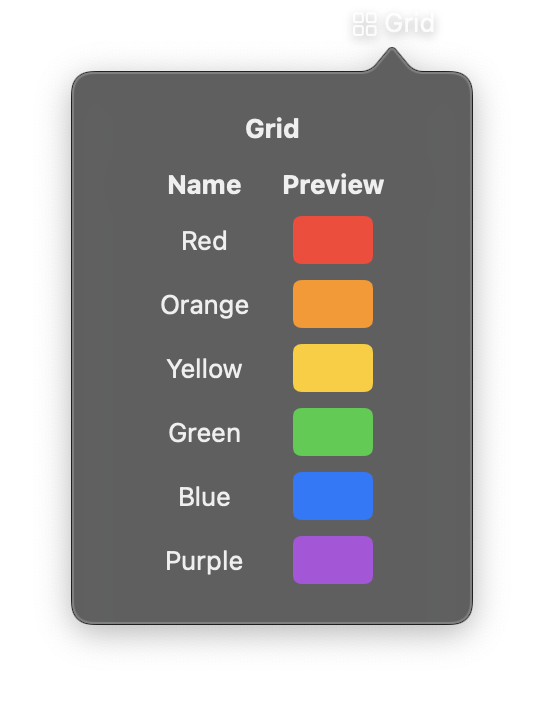
Grid arranges views in a fixed two-dimensional layout with explicit row and column structure. Unlike LazyVGrid and LazyHGrid, Grid sizes all views immediately rather than lazily.
Use GridRow to define individual rows within the grid. The number of columns is determined by the row with the most children.
Constructor
nib.Grid(
    controls=None,
    alignment=None,
    horizontal_spacing=None,
    vertical_spacing=None,
    **modifiers,
)
nib.GridRow(
    controls=None,
    alignment=None,
    **modifiers,
)
Parameters
Grid
| Parameter | Type | Default | Description |
|---|---|---|---|
controls |
list[View] |
None |
Child views, typically GridRow elements that define the grid structure. |
alignment |
str |
None |
Default alignment for all cells in the grid. |
horizontal_spacing |
float |
None |
Spacing in points between columns. |
vertical_spacing |
float |
None |
Spacing in points between rows. |
**modifiers |
Common view modifiers: padding, background, width, height, etc. |
GridRow
| Parameter | Type | Default | Description |
|---|---|---|---|
controls |
list[View] |
None |
Views in this row. Each view occupies one column. |
alignment |
str |
None |
Vertical alignment for this specific row, overriding the grid default. |
**modifiers |
Common view modifiers. |
Mutable Properties
| Property | Type | Description |
|---|---|---|
controls |
list[View] |
Get or set the child views (on both Grid and GridRow). Setting triggers a UI update. |
Examples
Simple 2x2 grid
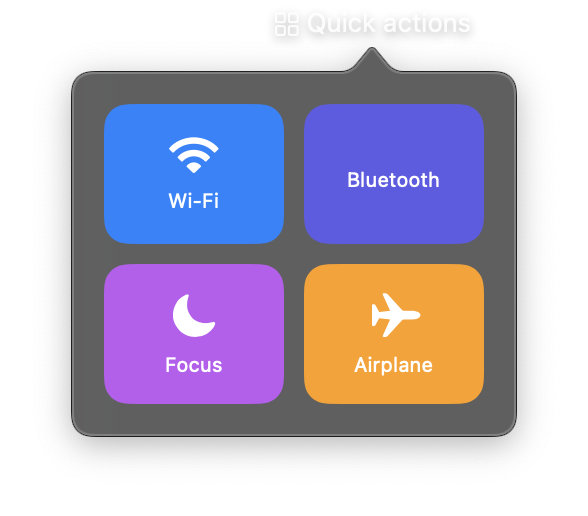
import nib


def main(app: nib.App):
    app.title = "Quick actions"
    app.icon = nib.SFSymbol("square.grid.2x2")

    def tile(icon, name, color):
        return nib.VStack(
            controls=[
                nib.SFSymbol(
                    icon, font=nib.Font.system(22), foreground_color=nib.Color.WHITE
                ),
                nib.Text(name, font=nib.Font.CAPTION, foreground_color=nib.Color.WHITE),
            ],
            spacing=6,
            width=90,
            height=70,
            background=nib.Rectangle(corner_radius=12, fill=color),
        )

    app.build(
        nib.Grid(
            controls=[
                nib.GridRow(
                    controls=[
                        tile("wifi", "Wi-Fi", "#0a84ff"),
                        tile("bluetooth", "Bluetooth", "#5e5ce6"),
                    ]
                ),
                nib.GridRow(
                    controls=[
                        tile("moon.fill", "Focus", "#bf5af2"),
                        tile("airplane", "Airplane", "#ff9f0a"),
                    ]
                ),
            ],
            horizontal_spacing=10,
            vertical_spacing=10,
            padding=16,
        )
    )


nib.run(main)
Label-value grid
Grid works well for creating aligned label-value pairs.
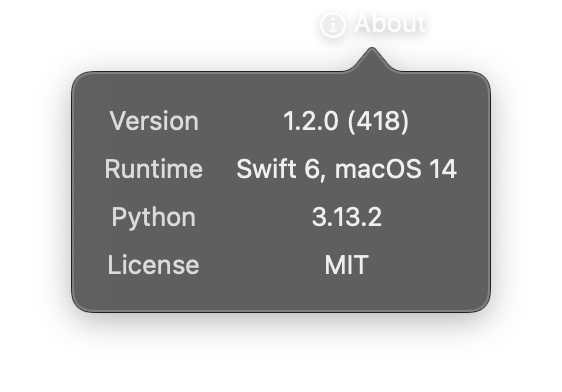
import nib


def main(app: nib.App):
    app.title = "About"
    app.icon = nib.SFSymbol("info.circle")

    def row(label, value):
        return nib.GridRow(
            controls=[
                nib.Text(label, foreground_color=nib.Color.SECONDARY),
                nib.Text(value),
            ],
            alignment="center",
        )

    app.build(
        nib.Grid(
            controls=[
                row("Version", "1.2.0 (418)"),
                row("Runtime", "Swift 6, macOS 14"),
                row("Python", "3.13.2"),
                row("License", "MIT"),
            ],
            horizontal_spacing=16,
            vertical_spacing=8,
            padding=16,
        )
    )


nib.run(main)