Drawing App
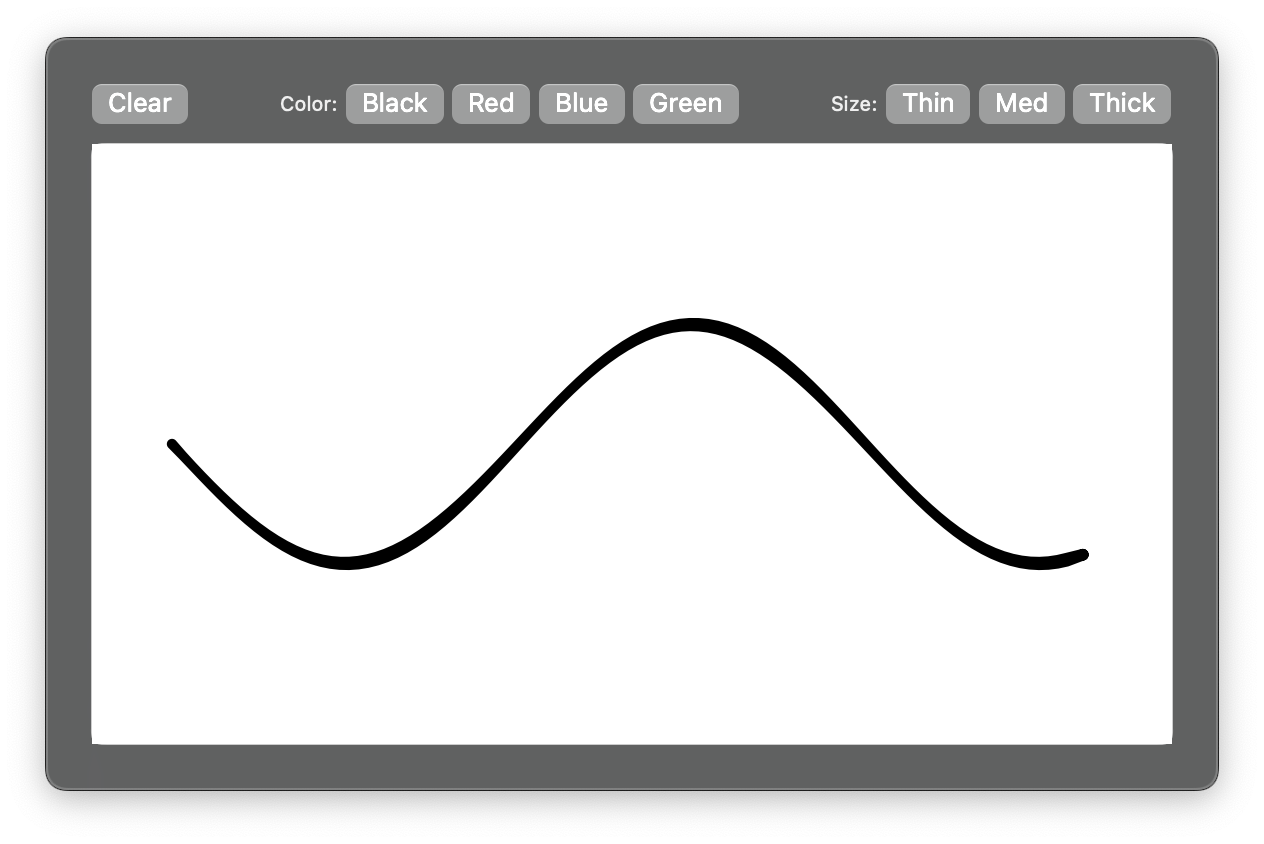
Freehand drawing with variable-width strokes, drawn as filled polygons on a Canvas. The stroke outline comes from a port of the perfect-freehand algorithm included in the file; no dependency.
What it shows
Canvaswithon_pan_start,on_pan_update,on_pan_endget_stroke(), a 110-line port of perfect-freehand, turning the pointer path into an outlinenib.draw.Polygonwithfillfor each strokecanvas.draw()with the finished strokes plus the one in progress- A toolbar of
Buttons for colour and stroke size
import math

import nib

# Stroke outlines: a port of perfect-freehand by Steve Ruiz (MIT),
# https://github.com/steveruizok/perfect-freehand. Round caps, no tapers.
FIXED_PI = math.pi + 0.0001
PRESSURE_RATE = 0.275


def _lerp(a, b, t):
    return (a[0] + (b[0] - a[0]) * t, a[1] + (b[1] - a[1]) * t)


def _rotate(p, c, r):
    s, co = math.sin(r), math.cos(r)
    x, y = p[0] - c[0], p[1] - c[1]
    return (x * co - y * s + c[0], x * s + y * co + c[1])


def _stroke_points(points, size, streamline, last):
    """Streamlined input points with direction, step and running length."""
    t = 0.15 + (1 - streamline) * 0.85
    pts = list(points)
    if len(pts) == 2:
        pts = [pts[0]] + [_lerp(pts[0], pts[1], i / 4) for i in range(1, 5)]
    if len(pts) == 1:
        pts.append((pts[0][0] + 1, pts[0][1] + 1))
    out = [{"p": tuple(pts[0]), "v": (1.0, 1.0), "d": 0.0, "len": 0.0}]
    prev, total, reached = out[0], 0.0, False
    for i in range(1, len(pts)):
        p = tuple(pts[i]) if last and i == len(pts) - 1 else _lerp(prev["p"], pts[i], t)
        if p == prev["p"]:
            continue
        d = math.dist(p, prev["p"])
        total += d
        if i < len(pts) - 1 and not reached:
            if total < size:
                continue
            reached = True
        v = ((prev["p"][0] - p[0]) / d, (prev["p"][1] - p[1]) / d)
        prev = {"p": p, "v": v, "d": d, "len": total}
        out.append(prev)
    out[0]["v"] = out[1]["v"] if len(out) > 1 else (0.0, 0.0)
    return out


def get_stroke(points, size=8.0, thinning=0.5, smoothing=0.5, streamline=0.5, last=False):
    """Closed outline of a stroke. Width follows speed: slow is wide, fast is thin."""
    if not points or size <= 0:
        return []
    pts = _stroke_points(points, size, streamline, last)
    total = pts[-1]["len"]
    min_dist = (size * smoothing) ** 2

    def radius_for(pressure):
        return size * (0.5 - thinning * (0.5 - pressure))

    def simulate(prev_pressure, step):
        sp = min(1.0, step / size)
        return min(1.0, prev_pressure + (min(1.0, 1 - sp) - prev_pressure) * sp * PRESSURE_RATE)

    prev_pressure = 0.25
    for q in pts[:10]:
        prev_pressure = (prev_pressure + simulate(prev_pressure, q["d"])) / 2

    radius = radius_for(0.5)
    first_radius = None
    prev_v = pts[0]["v"]
    pl = pr = pts[0]["p"]
    left, right = [], []
    prev_sharp = False
    n = len(pts)
    for i, q in enumerate(pts):
        p, v, step, run = q["p"], q["v"], q["d"], q["len"]
        if i < n - 1 and total - run < 3:
            continue
        pressure = simulate(prev_pressure, step) if thinning else 0.5
        radius = max(0.01, radius_for(pressure) if thinning else size / 2)
        if first_radius is None:
            first_radius = radius
        next_v = pts[i + 1]["v"] if i < n - 1 else v
        next_dpr = v[0] * next_v[0] + v[1] * next_v[1] if i < n - 1 else 1.0
        prev_dpr = v[0] * prev_v[0] + v[1] * prev_v[1]
        sharp = prev_dpr < 0 and not prev_sharp
        next_sharp = next_dpr < 0
        if sharp or next_sharp:
            ox, oy = prev_v[1] * radius, -prev_v[0] * radius
            for j in range(14):
                a = FIXED_PI * j / 13
                pl = _rotate((p[0] - ox, p[1] - oy), p, a)
                pr = _rotate((p[0] + ox, p[1] + oy), p, -a)
                left.append(pl)
                right.append(pr)
            prev_sharp = next_sharp
            continue
        prev_sharp = False
        if i == n - 1:
            ox, oy = v[1] * radius, -v[0] * radius
            left.append((p[0] - ox, p[1] - oy))
            right.append((p[0] + ox, p[1] + oy))
            continue
        mx, my = _lerp(next_v, v, next_dpr)
        ox, oy = my * radius, -mx * radius
        tl = (p[0] - ox, p[1] - oy)
        if i <= 1 or math.dist(pl, tl) ** 2 > min_dist:
            left.append(tl)
            pl = tl
        tr = (p[0] + ox, p[1] + oy)
        if i <= 1 or math.dist(pr, tr) ** 2 > min_dist:
            right.append(tr)
            pr = tr
        prev_pressure, prev_v = pressure, v

    first, last_p = pts[0]["p"], pts[-1]["p"]
    if first_radius is None:
        first_radius = radius
    if n == 1:
        dx, dy = first[0] - (first[0] + 1), first[1] - (first[1] + 1)
        d = math.hypot(dx, dy)
        start = (first[0] - dy / d * -first_radius, first[1] + dx / d * -first_radius)
        return [_rotate(start, first, FIXED_PI * 2 * j / 13) for j in range(1, 14)]
    start_cap = [_rotate(right[0], first, FIXED_PI * j / 13) for j in range(1, 14)]
    lv = pts[-1]["v"]
    dx, dy = -lv[1], lv[0]
    start = (last_p[0] + dx * radius, last_p[1] + dy * radius)
    end_cap = [_rotate(start, last_p, FIXED_PI * 3 * j / 29) for j in range(1, 30)]
    return left + end_cap + right[::-1] + start_cap


def main(app: nib.App):
    app.title = "Draw"
    app.icon = nib.SFSymbol("pencil.tip")
    app.width = 560
    app.height = 380

    canvas = nib.Canvas(
        width=540,
        height=300,
        background_color="#FFFFFF",
        enable_gestures=True,
    )

    color = "#000000"
    size = 8
    strokes = []  # finished strokes, one Polygon each
    points = []  # the stroke being drawn

    def outline(pts, last=False):
        return nib.draw.Polygon(
            points=get_stroke(pts, size=size, thinning=0.6, last=last),
            fill=color,
        )

    def redraw():
        current = [outline(points)] if len(points) > 1 else []
        canvas.draw(strokes + current)

    def on_pan_start(e: nib.PanEvent):
        points.clear()
        points.append((e.x, e.y))

    def on_pan_update(e: nib.PanEvent):
        points.append((e.x, e.y))
        redraw()

    def on_pan_end(e: nib.PanEvent):
        if len(points) > 1:
            strokes.append(outline(points, last=True))
        points.clear()
        redraw()

    canvas.on_pan_start = on_pan_start
    canvas.on_pan_update = on_pan_update
    canvas.on_pan_end = on_pan_end

    def clear_canvas():
        strokes.clear()
        points.clear()
        canvas.clear()

    def set_color(value):
        def apply():
            nonlocal color
            color = value

        return apply

    def set_size(value):
        def apply():
            nonlocal size
            size = value

        return apply

    # A sample stroke so the canvas is not empty at launch
    sample = [(40 + i * 4.6, 150 + 60 * math.sin(i / 12)) for i in range(100)]
    strokes.append(outline(sample, last=True))
    redraw()

    app.build(
        nib.VStack(
            controls=[
                nib.HStack(
                    controls=[
                        nib.Button("Clear", action=clear_canvas),
                        nib.Spacer(),
                        nib.Text("Color:", font=nib.Font.CAPTION),
                        nib.Button("Black", action=set_color("#000000")),
                        nib.Button("Red", action=set_color("#e74c3c")),
                        nib.Button("Blue", action=set_color("#3498db")),
                        nib.Button("Green", action=set_color("#2ecc71")),
                        nib.Spacer(),
                        nib.Text("Size:", font=nib.Font.CAPTION),
                        nib.Button("Thin", action=set_size(4)),
                        nib.Button("Med", action=set_size(8)),
                        nib.Button("Thick", action=set_size(14)),
                    ],
                    spacing=4,
                ),
                nib.VStack(
                    controls=[canvas],
                    background=nib.Rectangle(
                        corner_radius=5,
                        stroke="#cccccc",
                        stroke_width=1,
                    ),
                ),
            ],
            spacing=10,
            padding=10,
        )
    )


nib.run(main)
Walkthrough
Canvas
canvas = nib.Canvas(
    width=540,
    height=300,
    background_color="#FFFFFF",
    enable_gestures=True,
)
enable_gestures=True makes the canvas emit pan events. PanEvent carries x and y in canvas coordinates; there is no pressure value, so the stroke width is simulated from speed.
Gestures
def on_pan_start(e: nib.PanEvent):
    points.clear()
    points.append((e.x, e.y))

def on_pan_update(e: nib.PanEvent):
    points.append((e.x, e.y))
    redraw()

def on_pan_end(e: nib.PanEvent):
    if len(points) > 1:
        strokes.append(outline(points, last=True))
    points.clear()
    redraw()
points holds the stroke being drawn. On release it becomes one entry in strokes and the list is reset.
From points to an outline
def outline(pts, last=False):
    return nib.draw.Polygon(
        points=get_stroke(pts, size=size, thinning=0.6, last=last),
        fill=color,
    )
get_stroke() returns the closed outline of the stroke as a list of (x, y) points, so a filled Polygon renders it. It is a port of perfect-freehand by Steve Ruiz, MIT, kept in the example file. Two passes:
_stroke_points()streamlines the input: each new point moves only part of the way from the previous one, which removes jitter. It also records direction, step length and running length per point.get_stroke()walks those points and offsets left and right by a radius. The radius follows simulated pressure: a short step means slow movement and a wider stroke. Sharp corners get a 14-point arc, the ends get round caps, and the left side, end cap, reversed right side and start cap join into one polygon.
Parameters:
| Parameter | Effect |
|---|---|
size |
Base width in points |
thinning |
How much speed changes the width. 0 is constant width |
smoothing |
Minimum distance between outline points, as a fraction of size |
streamline |
How much the input path is smoothed. 0 follows the pointer exactly |
last |
True once the stroke is complete. The final point is then used as is |
size and color are read when outline() runs, so a finished stroke keeps the settings it was drawn with.
Redraw
def redraw():
    current = [outline(points)] if len(points) > 1 else []
    canvas.draw(strokes + current)
The outline of the current stroke changes with every new point, so the demo redraws the whole canvas rather than appending. canvas.draw() replaces all commands. With a few hundred strokes this is still well under a frame.
Toolbar
def set_color(value):
    def apply():
        nonlocal color
        color = value
    return apply

nib.Button("Red", action=set_color("#e74c3c"))
Each button gets a closure that sets color or size. Clear empties strokes and calls canvas.clear().
Sample stroke
A sine wave is drawn at launch so the popover is not empty. Delete the three sample lines in your own app.
Related
- Canvas
- Primitives:
nib.draw.Polygon - Canvas
- perfect-freehand: the original algorithm, with tapers and custom easing
- perfect-freehand-python: a full Python port