TextStyle & AttributedString
TextStyle is a dataclass that groups all text-related styling options into a single object. AttributedString allows creating rich text with different styles for different segments.
import nib

# TextStyle preset
title = nib.Text("Welcome", style=nib.TextStyle.TITLE)

# Custom TextStyle
styled = nib.Text("Custom", style=nib.TextStyle(bold=True, underline=True, color="red"))

# Rich text with AttributedString
rich = nib.Text(strings=[
    nib.AttributedString("Hello ", style=nib.TextStyle(color="blue")),
    nib.AttributedString("World", style=nib.TextStyle(bold=True)),
])
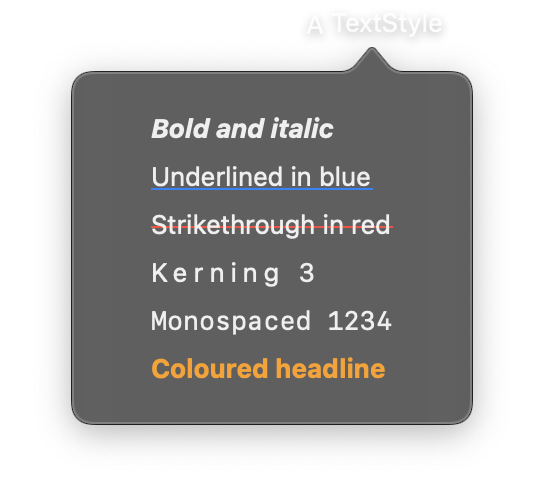
import nib


def main(app: nib.App):
    app.title = "TextStyle"
    app.icon = nib.SFSymbol("character")
    app.width = 300

    app.build(
        nib.VStack(
            controls=[
                nib.Text(
                    "Bold and italic", style=nib.TextStyle(bold=True, italic=True)
                ),
                nib.Text(
                    "Underlined in blue",
                    style=nib.TextStyle(underline=True, underline_color="#0a84ff"),
                ),
                nib.Text(
                    "Strikethrough in red",
                    style=nib.TextStyle(
                        strikethrough=True, strikethrough_color="#ff453a"
                    ),
                ),
                nib.Text("Kerning 3", style=nib.TextStyle(kerning=3)),
                nib.Text("Monospaced 1234", style=nib.TextStyle(monospaced=True)),
                nib.Text(
                    "Coloured headline",
                    style=nib.TextStyle(font=nib.Font.HEADLINE, color="#ff9f0a"),
                ),
            ],
            spacing=8,
            padding=20,
            alignment=nib.Alignment.LEADING,
        )
    )


nib.run(main)
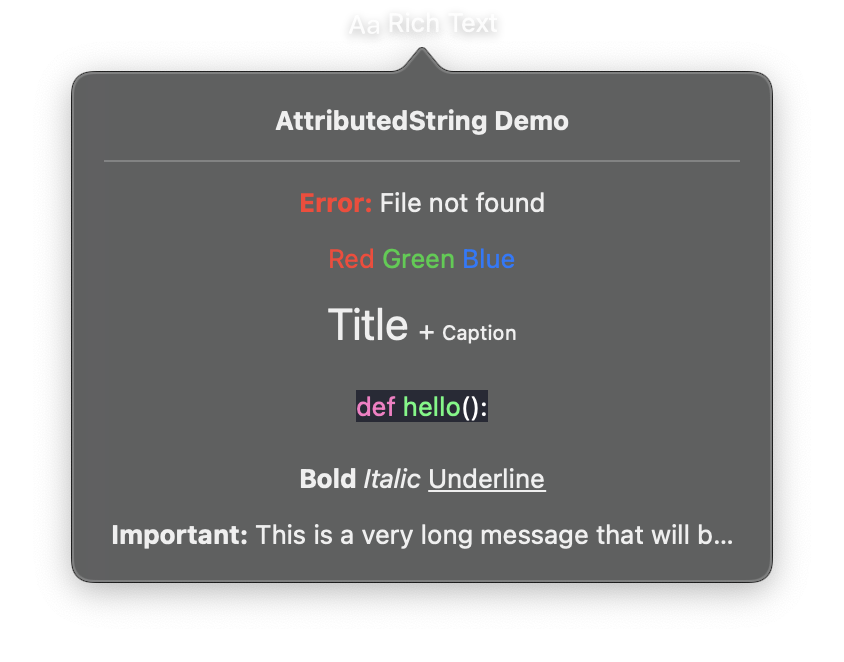
import nib


def main(app: nib.App):
    app.title = "Rich Text"
    app.icon = nib.SFSymbol("textformat")
    app.width = 350
    app.height = 400

    app.build(
        nib.VStack(
            controls=[
                nib.Text("AttributedString Demo", font=nib.Font.HEADLINE),
                nib.Divider(),
                # Example 1: Error message with styled prefix
                nib.Text(
                    strings=[
                        nib.AttributedString(
                            "Error: ",
                            style=nib.TextStyle(color="red", bold=True),
                        ),
                        nib.AttributedString(
                            "File not found",
                            style=nib.TextStyle.BODY,
                        ),
                    ],
                ),
                # Example 2: Colored text segments
                nib.Text(
                    strings=[
                        nib.AttributedString("Red ", color=nib.Color.RED),
                        nib.AttributedString("Green ", color=nib.Color.GREEN),
                        nib.AttributedString("Blue", color=nib.Color.BLUE),
                    ],
                ),
                # Example 3: Mixed fonts
                nib.Text(
                    strings=[
                        nib.AttributedString("Title ", font=nib.Font.TITLE),
                        nib.AttributedString("+ ", font=nib.Font.BODY),
                        nib.AttributedString("Caption", font=nib.Font.CAPTION),
                    ],
                ),
                # Example 4: Styled code snippet
                nib.Text(
                    strings=[
                        nib.AttributedString("def ", color="#FF79C6"),
                        nib.AttributedString("hello", color="#50FA7B"),
                        nib.AttributedString("():", color=nib.Color.WHITE),
                    ],
                    padding=8,
                    background=nib.Color(hex="#282A36"),
                ),
                # Example 5: Decorations
                nib.Text(
                    strings=[
                        nib.AttributedString(
                            "Bold ",
                            style=nib.TextStyle(bold=True),
                        ),
                        nib.AttributedString(
                            "Italic ",
                            style=nib.TextStyle(italic=True),
                        ),
                        nib.AttributedString(
                            "Underline",
                            style=nib.TextStyle(underline=True),
                        ),
                    ],
                ),
                # Example 6: With line limit
                nib.Text(
                    strings=[
                        nib.AttributedString(
                            "Important: ", style=nib.TextStyle(bold=True)
                        ),
                        nib.AttributedString(
                            "This is a very long message that will be truncated "
                            "if it exceeds the line limit we've set.",
                        ),
                    ],
                    line_limit=4,
                    truncation_mode=nib.TruncationMode.TAIL,
                ),
            ],
            spacing=12,
            padding=16,
        )
    )


nib.run(main)
TextStyle
The TextStyle dataclass combines font, decoration, and spacing properties into a single configuration object. Pass it to a Text view using the style parameter.
Constructor
TextStyle(
    font=None, color=None, weight=None,
    bold=False, italic=False,
    strikethrough=False, strikethrough_color=None,
    underline=False, underline_color=None,
    monospaced=False, monospaced_digit=False,
    kerning=None, tracking=None, baseline_offset=None,
)
Parameters
Font Settings
| Parameter | Type | Default | Description |
|---|---|---|---|
font |
Font |
None |
Font configuration (e.g., Font.BODY, Font.system(16)). |
color |
str |
None |
Text color (hex string or named color). |
weight |
str |
None |
Font weight string (e.g., "bold", "medium"). |
Text Decorations
| Parameter | Type | Default | Description |
|---|---|---|---|
bold |
bool |
False |
Apply bold formatting. |
italic |
bool |
False |
Apply italic formatting. |
strikethrough |
bool |
False |
Apply strikethrough decoration. |
strikethrough_color |
str |
None |
Color of the strikethrough line. |
underline |
bool |
False |
Apply underline decoration. |
underline_color |
str |
None |
Color of the underline. |
Font Variations
| Parameter | Type | Default | Description |
|---|---|---|---|
monospaced |
bool |
False |
Use monospaced font variant. |
monospaced_digit |
bool |
False |
Use monospaced digits (useful for tabular numbers). |
Spacing
| Parameter | Type | Default | Description |
|---|---|---|---|
kerning |
float |
None |
Spacing between character pairs in points. |
tracking |
float |
None |
Uniform spacing between all characters in points. |
baseline_offset |
float |
None |
Vertical offset from the text baseline in points. |
Presets
TextStyle provides predefined presets that match the system semantic font styles:
| Preset | Font Used |
|---|---|
TextStyle.LARGE_TITLE |
Font.LARGE_TITLE |
TextStyle.TITLE |
Font.TITLE |
TextStyle.TITLE2 |
Font.TITLE2 |
TextStyle.TITLE3 |
Font.TITLE3 |
TextStyle.HEADLINE |
Font.HEADLINE |
TextStyle.SUBHEADLINE |
Font.SUBHEADLINE |
TextStyle.BODY |
Font.BODY |
TextStyle.CALLOUT |
Font.CALLOUT |
TextStyle.CAPTION |
Font.CAPTION |
TextStyle.CAPTION2 |
Font.CAPTION2 |
TextStyle.FOOTNOTE |
Font.FOOTNOTE |
nib.Text("Title", style=nib.TextStyle.TITLE)
nib.Text("Body text", style=nib.TextStyle.BODY)
AttributedString
The AttributedString dataclass represents a single styled segment of text. Use it with Text(strings=[...]) to create rich text with multiple styles.
Constructor
AttributedString(content, style=None, color=None, font=None)
| Parameter | Type | Default | Description |
|---|---|---|---|
content |
str |
none | The text content for this segment. |
style |
TextStyle |
None |
Full text style configuration. |
color |
Color | str |
None |
Color override (takes precedence over style.color). |
font |
Font |
None |
Font override (takes precedence over style.font). |
When both style and direct overrides (color, font) are provided, the direct overrides take precedence.
Examples
Custom TextStyle with decorations
import nib

def main(app: nib.App):
    app.build(
        nib.VStack(
            controls=[
                nib.Text("Bold & Italic", style=nib.TextStyle(bold=True, italic=True)),
                nib.Text(
                    "Underlined",
                    style=nib.TextStyle(underline=True, underline_color="blue"),
                ),
                nib.Text(
                    "Deleted",
                    style=nib.TextStyle(strikethrough=True, color="gray"),
                ),
                nib.Text(
                    "W I D E",
                    style=nib.TextStyle(tracking=4.0, font=nib.Font.HEADLINE),
                ),
            ],
            spacing=8,
            padding=16,
        )
    )

nib.run(main)
Rich text with AttributedString
import nib

def main(app: nib.App):
    app.build(
        nib.VStack(
            controls=[
                nib.Text(strings=[
                    nib.AttributedString(
                        "Warning: ",
                        style=nib.TextStyle(bold=True, color="red"),
                    ),
                    nib.AttributedString(
                        "This action cannot be undone.",
                        style=nib.TextStyle.BODY,
                    ),
                ]),
                nib.Text(strings=[
                    nib.AttributedString("Price: ", font=nib.Font.BODY),
                    nib.AttributedString(
                        "$9.99",
                        style=nib.TextStyle(
                            font=nib.Font.system(20),
                            bold=True,
                            monospaced_digit=True,
                        ),
                        color=nib.Color.GREEN,
                    ),
                ]),
            ],
            spacing=12,
            padding=16,
        )
    )

nib.run(main)