SFSymbol
A view that displays an Apple SF Symbol icon. SF Symbols are a library of over 5,000 configurable icons designed for Apple platforms. SFSymbol inherits from View, so it supports all standard view modifiers.
Browse available symbols at developer.apple.com/sf-symbols or using the SF Symbols app.
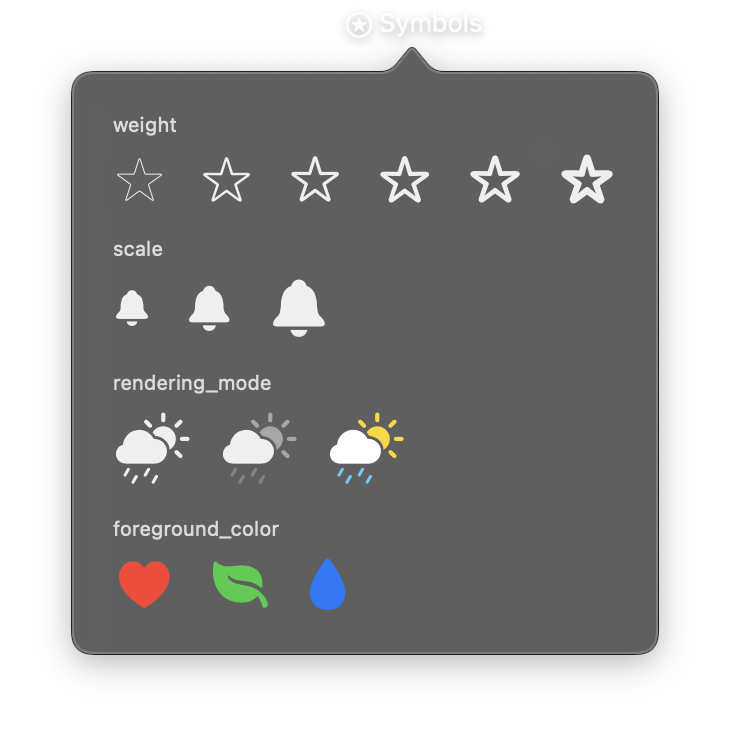
import nib


def main(app: nib.App):
    app.title = "Symbols"
    app.icon = nib.SFSymbol("star.circle")
    app.width = 340

    def row(label, symbols):
        return nib.VStack(
            controls=[
                nib.Text(
                    label, font=nib.Font.CAPTION, foreground_color=nib.Color.SECONDARY
                ),
                nib.HStack(controls=symbols, spacing=16),
            ],
            spacing=6,
            alignment=nib.Alignment.LEADING,
        )

    weights = ["ultraLight", "light", "regular", "semibold", "bold", "black"]
    app.build(
        nib.VStack(
            controls=[
                row(
                    "weight",
                    [
                        nib.SFSymbol("star", weight=w, font=nib.Font.system(22))
                        for w in weights
                    ],
                ),
                row(
                    "scale",
                    [
                        nib.SFSymbol("bell.fill", scale=s, font=nib.Font.system(22))
                        for s in ("small", "medium", "large")
                    ],
                ),
                row(
                    "rendering_mode",
                    [
                        nib.SFSymbol(
                            "cloud.sun.rain.fill",
                            rendering_mode=nib.SymbolRenderingMode.MONOCHROME,
                            font=nib.Font.system(26),
                        ),
                        nib.SFSymbol(
                            "cloud.sun.rain.fill",
                            rendering_mode=nib.SymbolRenderingMode.HIERARCHICAL,
                            font=nib.Font.system(26),
                        ),
                        nib.SFSymbol(
                            "cloud.sun.rain.fill",
                            rendering_mode=nib.SymbolRenderingMode.MULTICOLOR,
                            font=nib.Font.system(26),
                        ),
                    ],
                ),
                row(
                    "foreground_color",
                    [
                        nib.SFSymbol(
                            "heart.fill",
                            foreground_color=nib.Color.RED,
                            font=nib.Font.system(26),
                        ),
                        nib.SFSymbol(
                            "leaf.fill",
                            foreground_color=nib.Color.GREEN,
                            font=nib.Font.system(26),
                        ),
                        nib.SFSymbol(
                            "drop.fill",
                            foreground_color=nib.Color.BLUE,
                            font=nib.Font.system(26),
                        ),
                    ],
                ),
            ],
            spacing=14,
            padding=20,
            alignment=nib.Alignment.LEADING,
        )
    )


nib.run(main)
Constructor
nib.SFSymbol(
    name,
    weight=None,
    scale=None,
    rendering_mode=None,
    # View modifiers
    width=None,
    height=None,
    padding=None,
    foreground_color=None,
    background=None,
    opacity=None,
    font=None,
    font_weight=None,
    **kwargs,
)
Parameters
| Parameter | Type | Default | Description |
|---|---|---|---|
name |
str |
none | SF Symbol name, e.g. "star.fill", "gear", "heart.circle" |
weight |
str | None |
None |
Symbol weight. One of "ultralight", "thin", "light", "regular", "medium", "semibold", "bold", "heavy", "black" |
scale |
str | None |
None |
Symbol scale. One of "small", "medium", "large" |
rendering_mode |
SymbolRenderingMode | str | None |
None |
How colors are applied to the symbol. One of "monochrome", "hierarchical", "palette", "multicolor" |
In addition to the parameters above, SFSymbol accepts all standard View modifiers as keyword arguments:
| Parameter | Type | Default | Description |
|---|---|---|---|
width |
float | None |
None |
Fixed width in points |
height |
float | None |
None |
Fixed height in points |
padding |
float | dict | None |
None |
Padding around the symbol. Float for uniform, or dict with keys like "top", "bottom", "horizontal", "vertical" |
foreground_color |
str | Color | None |
None |
Symbol color. Accepts a color name, hex string, or Color instance |
background |
str | Color | None |
None |
Background color |
opacity |
float | None |
None |
Opacity from 0.0 (transparent) to 1.0 (opaque) |
font |
Font | None |
None |
Font that influences the symbol's size |
font_weight |
str | FontWeight | None |
None |
Alternative way to set symbol weight |
Properties
| Property | Type | Description |
|---|---|---|
name |
str |
The SF Symbol name. Readable and writable |
Usage Contexts
SFSymbol can be used in several contexts:
- Menu bar icon:
app.icon = nib.SFSymbol("star.fill") - Inside views: As a child of any layout container
- Button content:
nib.Button(content=nib.SFSymbol("plus"), action=add) - Menu item icon:
nib.MenuItem("Settings", icon="gear")(pass a string directly)
Examples
Basic icon in a layout
import nib

def main(app: nib.App):
    app.icon = nib.SFSymbol("star.fill")
    app.width = 300
    app.height = 100

    app.build(
        nib.HStack(
            controls=[
                nib.SFSymbol("heart.fill", foreground_color=nib.Color.RED),
                nib.Text("Favorites"),
            ],
            spacing=8,
            padding=16,
        )
    )

nib.run(main)
Styled symbol with weight, scale, and rendering mode
import nib

def main(app: nib.App):
    app.icon = nib.SFSymbol(
        "cloud.sun.rain.fill",
        rendering_mode="multicolor",
    )
    app.width = 300
    app.height = 200

    app.build(
        nib.VStack(
            controls=[
                nib.SFSymbol(
                    "cloud.sun.rain.fill",
                    weight="bold",
                    scale="large",
                    rendering_mode=nib.SymbolRenderingMode.MULTICOLOR,
                    font=nib.Font.system(48),
                ),
                nib.Text("Weather", font=nib.Font.HEADLINE),
            ],
            spacing=12,
            padding=20,
        )
    )

nib.run(main)
Related
- App: Uses
SFSymbolfor theiconproperty - MenuItem: Accepts SF Symbol name strings for the
iconparameter - Context Menu
- Label:
Labelview - Image: SF Symbols in
Image