SettingsPage & SettingsTab
Components for creating tabbed preferences windows that follow macOS conventions. SettingsPage defines the window, and SettingsTab defines each tab within it. The settings window is accessible via Cmd+, (standard macOS shortcut) or programmatically via the open() method.
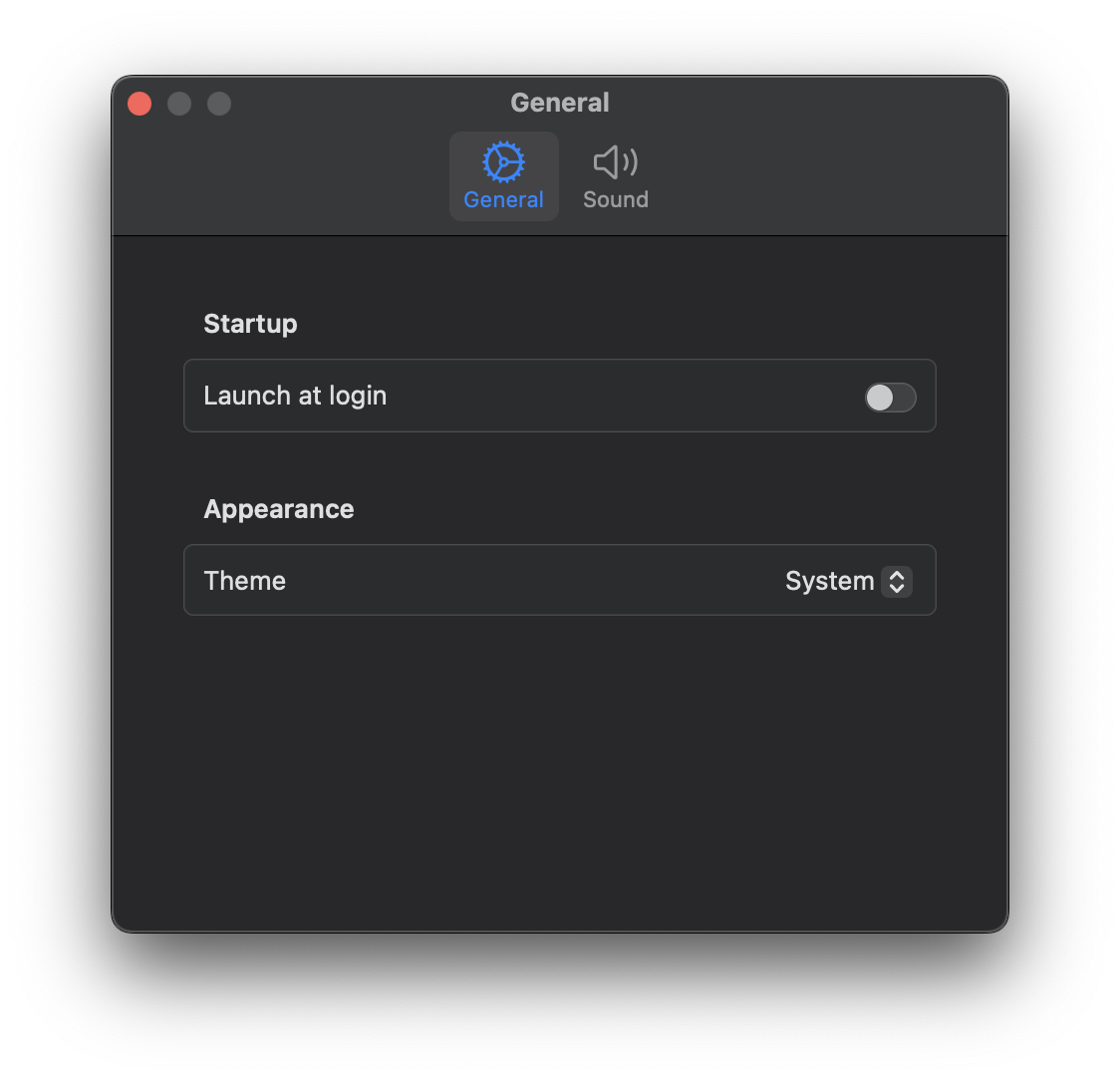
import nib


def main(app: nib.App):
    app.title = "Settings"
    app.icon = nib.SFSymbol("gearshape")

    settings = nib.Settings({"launch_at_login": False, "theme": "System", "volume": 50})
    app.register_settings(settings)

    app.settings = nib.SettingsPage(
        title="Preferences",
        width=440,
        height=300,
        tabs=[
            nib.SettingsTab(
                "General",
                icon="gear",
                content=nib.Form(
                    controls=[
                        nib.Section(
                            header="Startup",
                            controls=[
                                nib.Toggle(
                                    "Launch at login",
                                    is_on=settings.launch_at_login,
                                    on_change=lambda v: setattr(
                                        settings, "launch_at_login", v
                                    ),
                                ),
                            ],
                        ),
                        nib.Section(
                            header="Appearance",
                            controls=[
                                nib.Picker(
                                    "Theme",
                                    selection=settings.theme,
                                    options=["System", "Light", "Dark"],
                                    on_change=lambda v: setattr(settings, "theme", v),
                                ),
                            ],
                        ),
                    ],
                    style=nib.FormStyle.GROUPED,
                ),
            ),
            nib.SettingsTab(
                "Sound",
                icon="speaker.wave.2",
                content=nib.Form(
                    controls=[
                        nib.Slider(
                            label="Volume",
                            value=settings.volume,
                            min_value=0,
                            max_value=100,
                            on_change=lambda v: setattr(settings, "volume", v),
                        ),
                    ],
                    style=nib.FormStyle.GROUPED,
                ),
            ),
        ],
    )

    app.menu = [
        nib.MenuItem("Settings", shortcut="cmd+,", action=app.open_settings),
        nib.MenuDivider(),
        nib.MenuItem("Quit", shortcut="cmd+q", action=app.quit),
    ]
    # The window also opens from the context menu; opening it with the
    # popover makes the demo show it.
    app.on_appear = app.open_settings

    app.build(nib.Text("Settings are in the window", padding=20))


nib.run(main)
SettingsPage
Constructor
nib.SettingsPage(
    tabs=None,
    content=None,
    width=450,
    height=300,
    title="Settings",
)
Parameters
| Parameter | Type | Default | Description |
|---|---|---|---|
tabs |
list[SettingsTab] | None |
None |
List of SettingsTab objects for a tabbed interface |
content |
View | None |
None |
Single view for a non-tabbed settings page. If provided without tabs, automatically wraps in a single "General" tab with a gear icon |
width |
float |
450 |
Window width in points |
height |
float |
300 |
Window height in points |
title |
str |
"Settings" |
Window title text |
Properties
| Property | Type | Description |
|---|---|---|
tabs |
list[SettingsTab] |
The list of tabs in the settings page |
content |
View | None |
Single content view (if provided at construction) |
width |
float |
Window width |
height |
float |
Window height |
title |
str |
Window title |
Methods
open()
Open the settings window programmatically.
settings_page.open() -> None
close()
Close the settings window programmatically.
settings_page.close() -> None
SettingsTab
Constructor
nib.SettingsTab(title, icon=None, content=None)
Parameters
| Parameter | Type | Default | Description |
|---|---|---|---|
title |
str |
none | The tab title displayed in the tab bar |
icon |
str | None |
None |
SF Symbol name for the tab icon (e.g. "gear", "person", "bell") |
content |
View | None |
None |
The view displayed when this tab is selected |
Properties
| Property | Type | Description |
|---|---|---|
title |
str |
Tab title text |
icon |
str | None |
SF Symbol icon name |
content |
View | None |
Tab content view |
Examples
Multi-tab settings page
import nib

def main(app: nib.App):
    app.title = "My App"
    app.icon = nib.SFSymbol("star.fill")
    app.width = 300
    app.height = 200

    settings = nib.Settings({
        "dark_mode": False,
        "font_size": 14,
        "notifications": True,
    })
    app.register_settings(settings)

    app.settings = nib.SettingsPage(
        width=500,
        height=400,
        tabs=[
            nib.SettingsTab(
                "General",
                icon="gear",
                content=nib.Form(
                    controls=[
                        nib.Toggle(
                            "Dark Mode",
                            is_on=settings.dark_mode,
                            on_change=lambda v: setattr(settings, "dark_mode", v),
                        ),
                        nib.Slider(label="Font Size",
                            value=settings.font_size,
                            min_value=10,
                            max_value=24,
                            on_change=lambda v: settings.set("font_size", int(v)),
                        ),
                    ],
                ),
            ),
            nib.SettingsTab(
                "Notifications",
                icon="bell",
                content=nib.Form(
                    controls=[
                        nib.Toggle(
                            "Enable Notifications",
                            is_on=settings.notifications,
                            on_change=lambda v: setattr(settings, "notifications", v),
                        ),
                    ],
                ),
            ),
        ],
    )

    app.menu = [
        nib.MenuItem("Settings", action=app.settings.open, icon="gear", shortcut="cmd+,"),
        nib.MenuDivider(),
        nib.MenuItem("Quit", action=app.quit),
    ]

    app.build(
        nib.Text("Right-click for settings", padding=20)
    )

nib.run(main)
Simple single-view settings (no tabs)
import nib

def main(app: nib.App):
    app.title = "Simple App"
    app.icon = nib.SFSymbol("circle")
    app.width = 300
    app.height = 100

    app.settings = nib.SettingsPage(
        content=nib.VStack(
            controls=[
                nib.Text("Preferences", font=nib.Font.HEADLINE),
                nib.Toggle("Enable feature", is_on=True),
            ],
            spacing=12,
            padding=20,
        ),
        width=400,
        height=200,
    )

    app.build(
        nib.VStack(
            controls=[
                nib.Text("Hello!", padding=10),
                nib.Button("Open Settings", action=app.settings.open),
            ],
            spacing=8,
            padding=16,
        )
    )

nib.run(main)