Notification
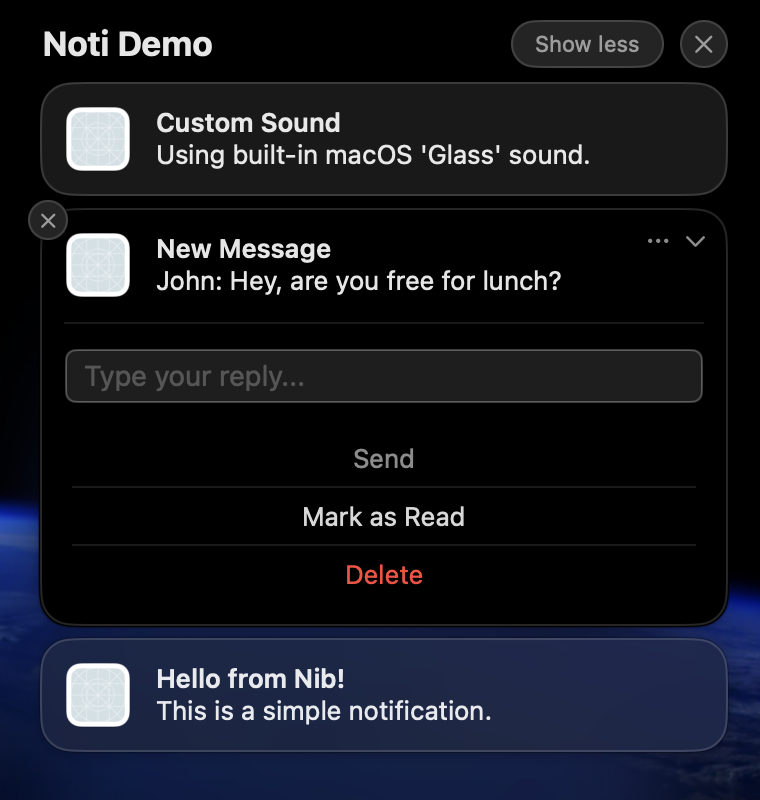
The Notification dataclass represents a single macOS notification. It holds the content (title, body, subtitle), optional sound configuration, and optional action buttons.
notification = nib.Notification(
    title="Download Complete",
    body="Your file has been saved",
)
app.notifications.push(notification)
Constructor
nib.Notification(
    title: str,
    body: str = "",
    subtitle: str = "",
    sound: NotificationSound | None = None,
    actions: list[NotificationAction] = [],
    id: str | None = None,
)
Parameters
| Parameter | Type | Default | Description |
|---|---|---|---|
title |
str |
none | The main title of the notification (required) |
body |
str |
"" |
The body text displayed below the title |
subtitle |
str |
"" |
A secondary line of text displayed below the title and above the body |
sound |
NotificationSound | None |
None |
Sound configuration. Pass NotificationSound() for the default sound, or configure a custom sound |
actions |
list[NotificationAction] |
[] |
List of action buttons displayed on the notification |
id |
str | None |
Auto-generated UUID | Unique identifier for this notification. Used for canceling or querying. Auto-generated if not provided |
Properties
| Property | Type | Description |
|---|---|---|
title |
str |
The notification title |
body |
str |
The notification body text |
subtitle |
str |
The notification subtitle |
sound |
NotificationSound | None |
Sound configuration |
actions |
list[NotificationAction] |
Action buttons |
id |
str |
Unique notification identifier |
Methods
to_dict()
Convert the notification to a dictionary for serialization. Used internally when sending to the Swift runtime.
notification.to_dict() -> dict
Notification.from_dict(data)
Class method to create a Notification from a dictionary. Used internally when receiving notification data from the Swift runtime.
Notification.from_dict(data: dict) -> Notification
Examples
Simple notification
import nib

def main(app: nib.App):
    app.title = "Notify"
    app.icon = nib.SFSymbol("bell")
    app.width = 280
    app.height = 100

    def send():
        notification = nib.Notification(
            title="Hello!",
            body="This is a notification from your Nib app.",
        )
        app.notifications.push(notification)

    app.build(
        nib.VStack(
            controls=[nib.Button("Send Notification", action=send)],
            padding=20,
        )
    )

nib.run(main)
Notification with subtitle and sound
import nib

notification = nib.Notification(
    title="New Message",
    subtitle="From: Alice",
    body="Hey, are you free for coffee?",
    sound=nib.NotificationSound(name=nib.NotificationSoundName.DEFAULT),
)
Use a stable ID so you can cancel or replace it later
notification = nib.Notification( title="Downloading...", body="50% complete", id="download-progress", ) app.notifications.push(notification)
Update the same notification by reusing the ID
updated = nib.Notification( title="Downloading...", body="100% complete", id="download-progress", ) app.notifications.push(updated)
Cancel it
app.notifications.cancel_notification("download-progress") ```
Related
- NotificationManager: Push, schedule, and manage notifications
- Sound & Actions: Configure sounds and action buttons
- Notifications