TextField
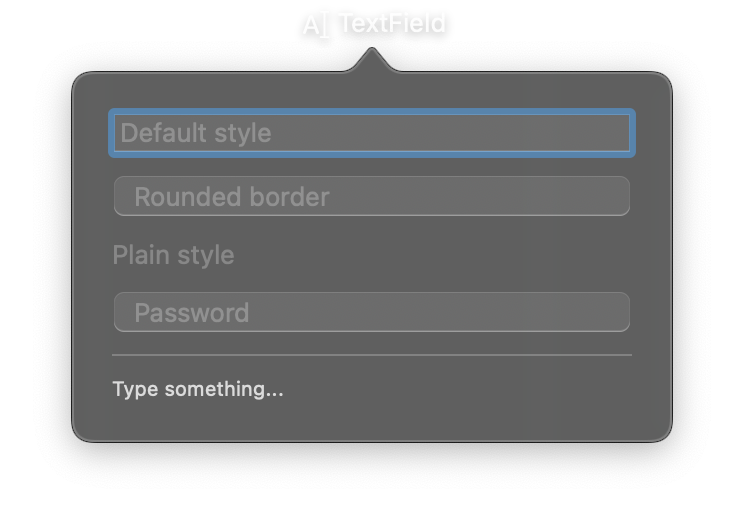
A single-line text input control with placeholder text, change callbacks, and submit handling. The value property is reactive. Reading and writing it directly allows for straightforward state management.
Constructor
nib.TextField(
    placeholder="",
    value="",
    on_change=None,
    on_submit=None,
    style=None,
    autocapitalization=None,
    autocorrection=None,
    keyboard_type=None,
    submit_label=None,
    disabled=False,
    **modifiers,
)
Parameters
| Parameter | Type | Default | Description |
|---|---|---|---|
placeholder |
str |
"" |
Hint text displayed when the field is empty. |
value |
str |
"" |
Initial text value. Use the value property for reactive updates. |
on_change |
Callable[[str], None] |
None |
Callback called when text changes. Receives the new text as a string argument. |
on_submit |
Callable[[str], None] |
None |
Callback called when the user presses Return/Enter. Receives the current text value. |
style |
TextFieldStyle | str |
None |
Visual style. Options: TextFieldStyle.automatic, TextFieldStyle.plain, TextFieldStyle.roundedBorder. |
autocapitalization |
str |
None |
Autocapitalization behavior. Options: "none", "words", "sentences", "allCharacters". |
autocorrection |
bool |
None |
Whether to enable autocorrection. True to enable, False to disable, None for system default. |
keyboard_type |
str |
None |
Keyboard type. Options: "default", "asciiCapable", "numbersAndPunctuation", "URL", "numberPad", "emailAddress", "decimalPad". |
submit_label |
str |
None |
Label for the Return/Enter key (e.g., "Search", "Go"). |
disabled |
bool |
False |
Whether the text field is disabled and non-interactive. |
**modifiers |
Common view modifiers: padding, background, foreground_color, font, opacity, width, etc. |
Mutable Properties
| Property | Type | Description |
|---|---|---|
value |
str |
Get or set the current text. Setting triggers a UI update. |
Methods
| Method | Description |
|---|---|
focus() |
Make the field first responder. |
blur() |
Resign first responder. |
select_all() |
Select all text. The field must be focused. |
Examples
Basic text input with placeholder
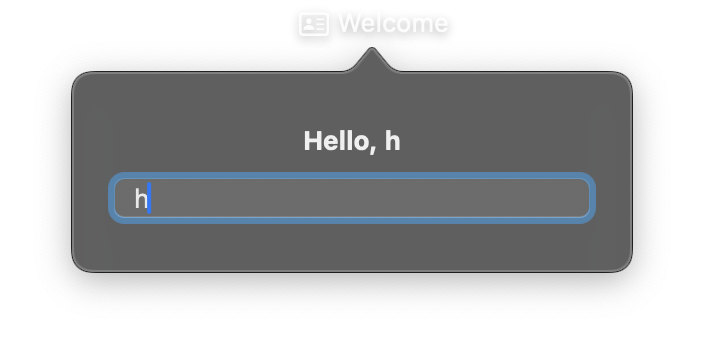
import nib


def main(app: nib.App):
    app.title = "Welcome"
    app.icon = nib.SFSymbol("person.text.rectangle")

    greeting = nib.Text("Hello, stranger", font=nib.Font.HEADLINE)

    def on_name(value):
        greeting.content = f"Hello, {value.strip() or 'stranger'}"

    app.build(
        nib.VStack(
            controls=[
                greeting,
                nib.TextField(
                    placeholder="Your name",
                    value="",
                    on_change=on_name,
                    style=nib.TextFieldStyle.ROUNDED_BORDER,
                    width=240,
                ),
            ],
            spacing=10,
            padding=20,
        )
    )


nib.run(main)
Search field with submit
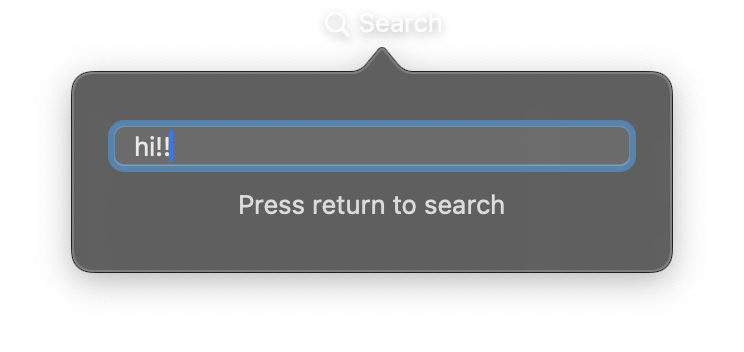
import nib


def main(app: nib.App):
    app.title = "Search"
    app.icon = nib.SFSymbol("magnifyingglass")
    app.width = 310

    results = nib.Text("Press return to search", foreground_color=nib.Color.SECONDARY)

    def search(query):
        results.content = (
            f'3 results for "{query}"' if query else "Press return to search"
        )

    app.build(
        nib.VStack(
            controls=[
                nib.TextField(
                    placeholder="Search notes",
                    value="",
                    on_submit=search,
                    submit_label="Search",
                    style=nib.TextFieldStyle.ROUNDED_BORDER,
                    width=260,
                ),
                results,
            ],
            spacing=10,
            padding=20,
        )
    )


nib.run(main)
Related
- SecureField
- TextEditor
- Ref:
focus()via a handle - Views and Events
- Form