Drop Zone
Drop Zone
A popover that accepts dropped files, copies their paths to the clipboard, and reports through a global hotkey.
What it shows
on_dropon a container viewapp.clipboardandapp.set_clipboard()@app.hotkey()andapp.notify()- A context menu with an icon and a shortcut
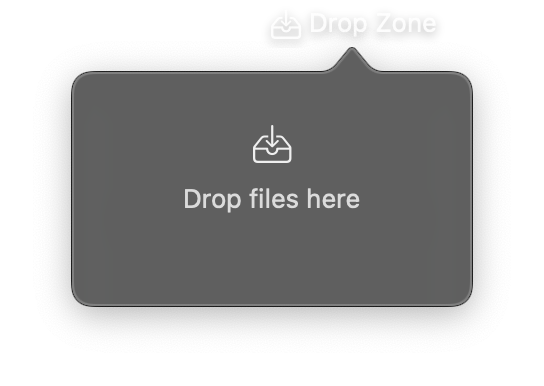
import nib


def main(app: nib.App):
    app.title = "Drop Zone"
    app.icon = nib.SFSymbol("tray.and.arrow.down")
    app.width = 280
    app.height = 180

    status = nib.Text("Drop files here", foreground_color=nib.Color.SECONDARY)
    paths_text = nib.Text("", font=nib.Font.CAPTION)

    def handle_drop(paths):
        status.content = f"{len(paths)} dropped"
        paths_text.content = "\n".join(paths[-3:])
        app.clipboard = "\n".join(paths)

    @app.hotkey("cmd+shift+d")
    def announce():
        app.notify("Drop Zone", status.content)

    app.menu = [
        nib.MenuItem(
            "Copy paths", action=lambda: app.set_clipboard(paths_text.content), icon="doc.on.doc"
        ),
        nib.MenuDivider(),
        nib.MenuItem("Quit", action=app.quit, shortcut="cmd+q"),
    ]

    app.build(
        nib.VStack(
            controls=[
                nib.SFSymbol("tray.and.arrow.down", scale="large"),
                status,
                paths_text,
            ],
            spacing=8,
            padding=24,
            on_drop=handle_drop,
        )
    )


nib.run(main)
Walkthrough
The drop target
on_drop=handle_drop on the VStack makes the whole popover a drop target. The callback receives a list of absolute paths; files or directories.
Clipboard
app.clipboard = text writes the clipboard. The menu item does the same through app.set_clipboard().
Hotkey and notification
@app.hotkey("cmd+shift+d") registers a global shortcut. It fires with the popover closed. The handler posts a notification with app.notify(title, body).
Related
- Drag and Drop
- Hotkeys and Clipboard
- Notifications
- App:
hotkey,clipboard,notify,menu