Architecture
Nib is two processes. Python owns the logic: your code, the view tree, state and callbacks. Swift owns the screen: the nib-runtime binary renders the tree with SwiftUI, hosts the menu bar item and the popover, and wraps the system services (notifications, clipboard, file dialogs, keychain, camera, and so on).
They talk over a Unix domain socket with length-prefixed MessagePack frames: a 4-byte big-endian length followed by the packed message.
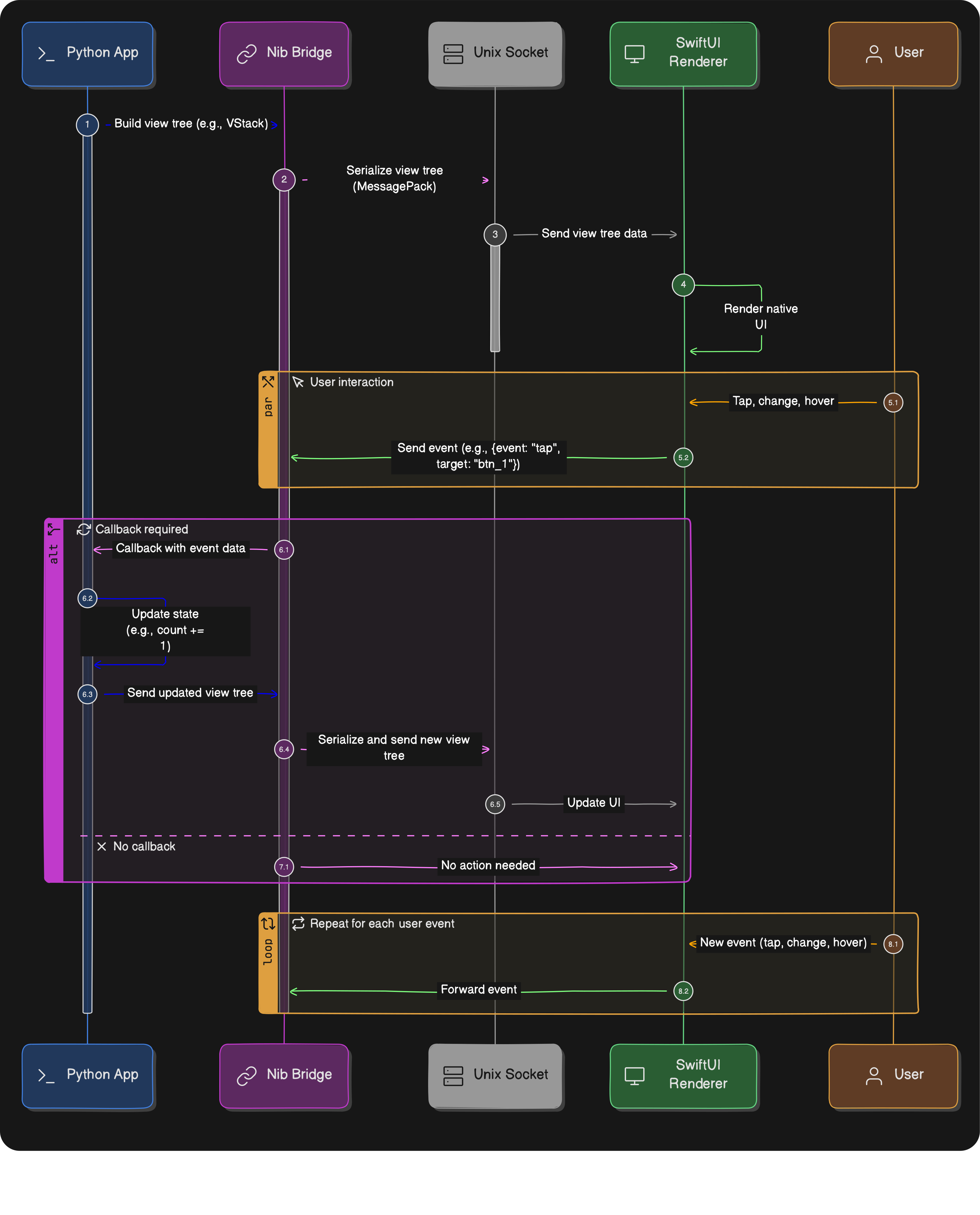
Messages
| Direction | Message | Purpose |
|---|---|---|
| Python to Swift | flatRender |
The complete view tree as a flat node list plus the app chrome: icon, title, window size, context menu, hotkeys, fonts, and the protocol version. Sent on the first render and whenever the tree's structure changes. |
| Python to Swift | patch |
What changed on an otherwise identical tree: props or modifiers for a node, or canvasAppend with the commands added to a canvas. Sent on every other update. |
| Python to Swift | quit, notify, notification, clipboard, fileDialog, userDefaults, service, action, settingsRender |
Commands for the runtime and its services. |
| Swift to Python | event |
A user interaction: the node id, the event name (tap, change, submit, drop, hover, region, ...) and a typed value. |
| Swift to Python | serviceResponse, notificationResponse, fileDialogResponse, UserDefaults replies |
Answers to the commands above, matched by request id. |
The SDK keeps a packed snapshot of every node and compares it with the next render. Nodes whose props or modifiers differ produce a patch; a node added, removed, reordered or retyped forces a full flatRender. For a Canvas that only grew, the patch carries just the new drawing commands.
Protocol version
nib.core.protocol.PROTOCOL_VERSION is the single source of truth. make gen bakes it, together with the view types and props the Python classes declare, into package/Nib/Generated/NibSchema.swift; the runtime compares versions when a client connects and logs a mismatch. A wheel always ships an SDK and a runtime that agree.
Two launch modes
Development (nib run or python main.py): Python is the parent. It finds the runtime (NIB_RUNTIME, then the binary shipped in the SDK, then package/.build in a checkout), starts it in its own session and connects to the socket path it chose. nib run additionally watches your files and reloads the Python side while the runtime keeps running.
Bundled (nib build output): the runtime is the .app executable. It creates the socket, starts the embedded Python interpreter with your code, and hands over NIB_SOCKET, NIB_BUNDLE_ID and NIB_LOG_FILE in the environment. The protocol is identical; your code does not change.
Threads
On the Python side your main() runs on the main thread. Three background threads do the rest:
| Thread | Work |
|---|---|
| render loop | Wakes when a property changed, serialises and diffs the tree, sends the frame. Rapid changes coalesce into one frame. |
| socket reader | Reads frames from the runtime and routes replies to waiting callers. |
| event thread | Runs your callbacks one at a time, in order. Nothing of yours runs on the socket thread. |
You may set view properties from any thread. See Reactivity for what that means for long-running work.
Identity, settings and logs
Each app has a bundle identifier, app.identifier, which names its UserDefaults domain. It defaults to com.nib.<slug of the title>, nib run passes the identifier the build would use, and a built app uses its CFBundleIdentifier, so settings saved in development are found by the built app.
Both processes append to one log file: NIB_LOG_FILE if set, else /tmp/nib-<identifier>.log. It is rotated to .1 at 5 MB. NIB_LOG_LEVEL=debug turns on per-frame logging on both sides.
Related
- nib run: dev mode
- nib build: bundled launch mode
- Logging: log file
- App:
Appproperties and callbacks - Reactivity: patch messages